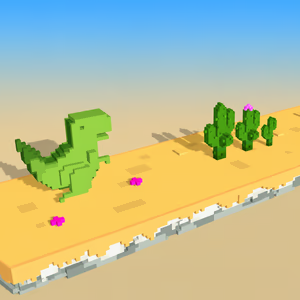
Dinosaur Game 3d
 Geometry Dash Scratch
 Wave Race
 Geometry Ball: Challenge
 Geometry Dash Hyper Wave
 Two Tunnel 3d
 Geometry Vibes Monster
 Geometry Dash Lite Old Version
 Geometry Dash 3D
 Subway Surfers
 Space Waves
 Geometry Dash Subzero
 Geometry Dash Bloodbath
 Geometry Dash Spam
 Geometry Dash Grief
 Geometry Dash Wave
 Geometry Dash World
 Geometry Dash Wave Challenge
 Geometry Arrow
 Geometry Dash Sonic Wave
 Geometry Vibes
 Geometry Dash Breeze
 Geometry Dash Tidal Wave
 Geometry Dash Nine Circles
 Geometry Dash Press Start
 Geometry Dash Meltdown
 Geometry Dash Demons
 Geometry Dash Retray
 Geometry Dash Extrapolation
 Geometry Dash Suponho
 Geometry Dash Polargeist
 Geometry Dash Onward
 Another Drink Dash
 Geometry Dash Wave 3d
 Geometry Dash Spam 3D
 Geometry Dash Daily Level Dream World
 Slope 3
 Geometry Dash Deadlocked
 Geometry Dash Switch
 Geometry Dash Hairless Adventure
 Geometry Dash Slow
 Geometry Vibes 3d
 On On Dash
 No Broke Dash
 Gaminia
 Geometry Arrow 3D
 Geometry Dash Subzero 3D
 Neon Challenge Legends
 Infrunami
 Geometry Dash Meltdown 3d
 Geometry Dash Breeze 3D
 Victory Lap Dash
 I Just Might Dash
From Chrome Dino to the World of Dinosaur Game 3D
Dinosaur Game 3D takes inspiration from Chrome Dinosaur Game, the familiar dinosaur title that first appeared in the Google Chrome browser in 2014. Originally, the game was created as a small entertainment feature for users who lost their internet connection. The image of a T-Rex running through the desert, dodging cacti and flying creatures, quickly became memorable thanks to its simple and accessible gameplay.
Chrome Dino's appeal comes from combining basic controls with constant reflex challenges. Players don't need to memorize complicated rules or complete complex missions. With just a few jumping and ducking actions, every run becomes a chance to beat the previous high score. This minimalist approach has helped the game remain popular over the years and become a familiar part of the Chrome browsing experience.
Advances in web graphics technology opened up new opportunities to bring this gameplay formula into a three-dimensional environment. One notable project is Priler's T-Rex Run 3D, which uses WebGL and Three.js to build a 3D world for the dinosaur game. Characters, obstacles, and desert scenery are transformed into models with depth, creating a fresh perspective compared to the original 2D version.
Dinosaur Game 3D builds on the appeal of endless running while placing the T-Rex in a more immersive environment. The path is no longer presented as a flat horizontal surface but stretches forward into the distance, while obstacles have clear positions and dimensions in the three-dimensional world. These changes make judging distances, timing jumps, and reacting to obstacles essential parts of every run.
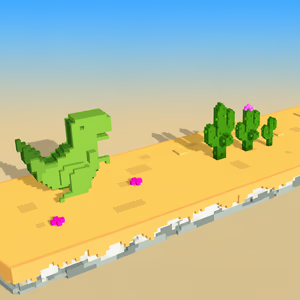
Figure 1. One wrong move can end your run! Enter Dinosaur Game 3D
Master Every Step in Dinosaur Game 3D
Keep Running and Try to Survive
In Dinosaur Game 3D, the T-Rex automatically runs forward without requiring players to control its direction constantly. The main task is to watch the path and perform the necessary actions to avoid collisions. The farther the T-Rex runs, the more opportunities players have to achieve a higher score. However, maintaining a strong performance requires consistent focus, especially when obstacles appear one after another. A poorly timed move can end the entire run and force players to start over.
Jump and Duck to Avoid Obstacles
Jumping and ducking are two essential actions that help the T-Rex overcome dangers along the path. When facing ground obstacles such as cacti, players must press the jump key at the right moment to clear them. Timing is crucial because jumping too early or too late can still result in a collision.
For Pterodactyls and other flying creatures moving at low heights, ducking is an effective response in versions that support this action. Players need to recognize an obstacle's position before choosing how to react. Combining jumps and ducks creates a more flexible rhythm, with different situations demanding different responses.
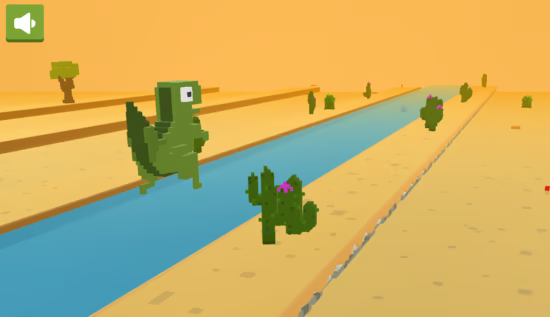
Figure 2. A running T-Rex through cacti, flying creatures
Dinosaur Game 3D Controls
Dinosaur Game 3D features a simple control system that makes it easy to perform actions and avoid obstacles. On PC, the main controls include:
-
Space / Arrow Up: Makes the T-Rex jump over cacti and other ground obstacles.
-
Arrow Down / Ctrl: Makes the dinosaur duck to avoid low-flying Pterodactyls.
-
Space: Starts or restarts a run in versions that support this action.
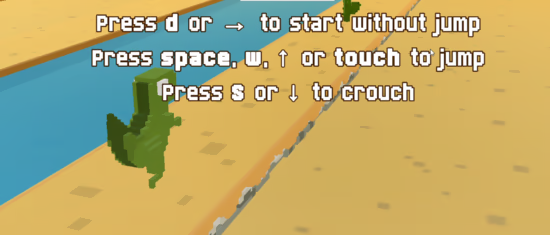
Figure 3. Control a fearless T-Rex
Obstacles Blocking the T-Rex's Path
Cacti - Familiar Obstacles in the Desert
Cacti are signature obstacles that appear throughout the T-Rex's journey. These sharp plants stand directly on the running path, forcing players to jump over them to keep moving. They can appear individually or in groups, creating situations that require more precise timing.
Clearing a single cactus is usually straightforward when players choose the right moment to jump. However, groups of closely spaced cacti require better control over jump timing and landing.
Pterodactyls - Threats from Above
Unlike cacti that remain fixed on the ground, Pterodactyls create threats from above. These flying creatures appear at different heights and can block the T-Rex's path even when the ground ahead is clear.
Their appearance requires players to watch both the space ahead and the dinosaur's position. Some situations call for ducking to avoid a collision, while flying obstacles at different heights may require other responses.
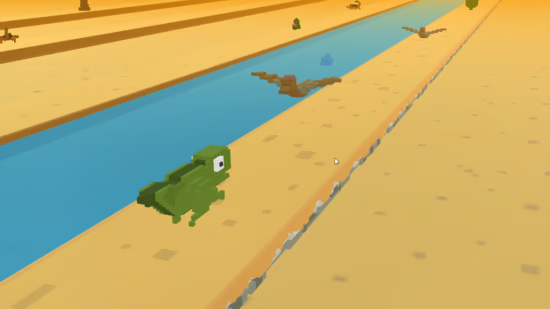
Figure 4. The T-Rex lowers its head to dodge danger
Terrain and Obstacle Placement
Beyond the shape of each obstacle, the distance and arrangement between them also directly affect the difficulty. Obstacles spaced far apart give players enough time to prepare their next move. In contrast, consecutive groups make jumping, landing, and switching to the next action more challenging.
As running speed increases, the time available to observe and react becomes shorter. Players need to pay attention to the entire stretch of road ahead instead of focusing only on the nearest obstacle. This keeps every Dinosaur Game 3D run challenging and puts observation and quick decision-making to the test.
3D Graphics and Desert Environment in Dinosaur Game 3D
Voxel-Style Dinosaur and Object Designs
Dinosaur Game 3D uses voxel graphics, with models built from distinct geometric blocks. The T-Rex retains the recognizable shape of the dinosaur from Chrome Dino but appears as a three-dimensional model rather than a collection of flat pixels.
Objects such as cacti, Pterodactyls, and environmental details follow the same visual style. This consistent design makes different elements easy to recognize as they appear along the path. Instead of using highly detailed models, the game focuses on clear shapes, distinguishable colors, and designs that stay close to classic pixel art.
Perspective Creates a Sense of Depth
One major change from Chrome Dino 2D to Dinosaur Game 3D is the camera perspective. In versions that use a rear camera, the T-Rex occupies the foreground while the road stretches toward the horizon. Objects in the distance appear smaller and gradually grow larger as they approach the dinosaur. This perspective effect creates a continuous sense of movement and gives the environment a clear sense of depth.
Desert Landscape and Environmental Effects
The desert serves as the main setting in Dinosaur Game 3D, with a road stretching toward the horizon and obstacles scattered along the route. The open environment allows players to focus on the T-Rex's movement while making obstacles stand out along the running path.
Cacti scattered throughout the environment create the familiar look of an arid landscape. Combined with perspective and voxel models, the desert feels more expansive than the traditional 2D background. This design preserves Chrome Dino's minimalist spirit while creating a recognizable three-dimensional world with greater depth.
Can You Play Dinosaur Game 3D for Free?
Yes! Players can visit the Geometry Dash Lite website to explore Dinosaur Game 3D along with many other exciting online titles. The game offers a straightforward endless-running experience where observation and reflexes determine how long the T-Rex can survive.
Alongside the desert escape, the game library also features plenty of options across action, puzzle, adventure, and arcade genres. It's a great destination for anyone looking for browser games that are quick to access, easy to learn, and require little preparation.