Background and Visual Style of Geometry Dash Daily Level Dream World
Background
Geometry Dash Daily Level Dream World takes players into a fantasy-inspired geometric world where floating platforms, obstacles, and portals appear throughout the course. Each area is designed to create a sense of exploration while challenging players to observe their surroundings carefully before jumping or flying.
What makes Dream World stand out is the changing environment as players move forward. Instead of following a familiar path, players must adapt to areas with different gravity directions and unexpected route layouts.

Figure 1. Explore Geometry Dash Daily Level Dream World
Visual Style
Dream World features a neon geometric style in a two-dimensional space, with layered shapes that create a sense of depth. The dark purple background consists of overlapping polygonal patterns, while diagonal light beams stretch across the screen to create a lively digital landscape.
Along the path, glowing squares, rectangles, and obstacles appear in shades of teal, blue, pink, and purple. White stars, sparkling particle effects, and neon outlines add contrast, making these objects stand out against the dark background.
The combination of a two-dimensional layout and layered visual elements creates a sense of depth while highlighting challenges that require players to observe carefully and time their movements precisely.
What Should You Know Before Playing Geometry Dash Daily Level Dream World?
Gameplay
Geometry Dash Daily Level Dream World focuses on timing, reflexes, and memorizing level layouts. The character automatically moves forward, so players must tap or hold the controls to overcome obstacles along the way.
Platforms, spikes, saw blades, and portals form a continuous series of challenges. Instead of tapping repeatedly, watch the distance between obstacles and find the right moment for each action. When facing a difficult section, repeated practice helps you memorize obstacle positions and improve your accuracy.
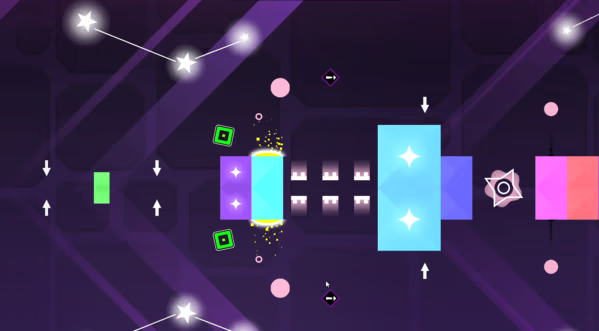
Figure 2. Gameplay of Dream World
Controls
The game uses a simple control system that works for both newcomers and experienced Geometry Dash players:
- Left Mouse Button: Jump or trigger the appropriate movement action, depending on the current form.
- Spacebar: Jump. In Ship mode, hold the key to fly upward and release it to descend.
- Hold and Release: Adjust your altitude while controlling the flying character.
Game Modes
Dream World offers two main ways to play: completing the level and practicing difficult sections.
- Normal Mode: The goal is to overcome every obstacle and reach the finish line. Stay focused from start to finish and remember the transition points to avoid mistakes as the level progresses.
- Practice Mode: This mode is useful for learning complex sections. If the version you're playing supports checkpoints, you can mark specific spots for repeated practice instead of replaying the entire level after every failure. This helps you memorize the layout and refine your control skills.
Movement Forms
Cube - Jump Across Platforms
In Cube mode, the character jumps across colored blocks, spikes, and saw blades along the path. Jump pads and jump rings help you perform higher or chained jumps, but precise timing is still essential to avoid collisions.
Ship - Control Your Flight
In Ship mode, hold the control button to fly upward and release it to descend. Narrow passages and obstacles make altitude control an essential skill. Adjust your movements carefully to keep the character on a safe path.
Portals - Adapt to New Mechanics
Depending on the level design, portals can change the movement form, character size, or direction of gravity. After passing through a portal, quickly identify the new mechanics and adjust your controls accordingly.
Coins and Hidden Collectibles
Beyond completing the level, Dream World encourages players to explore areas containing coins. These collectibles may be positioned away from the main route or placed in sections that require more precise movements.
To find coins more effectively, pay attention to secondary platforms, hard-to-reach gaps, and alternative paths that appear during transitions. Don';t rush into a jump before identifying your landing spot. If you want to collect every item, focus on memorizing each location and practicing the sections that require extra precision.
FAQs about Geometry Dash Daily Level Dream World
Yes. This version supports mobile devices, so you only need an internet connection to play.
Do you need to download the game?
No. Dream World lets you start playing directly on the website without installing a separate application.
How can you improve your performance in Dream World?
Focus on memorizing sections where you often crash, adjusting your jump timing, and practicing altitude control in Ship mode. If checkpoints are available, use them to practice difficult sections individually.
Why does the character keep crashing even when you tap at the right time?
Timing also depends on your character's position, the distance to nearby obstacles, and your current movement form. Try adjusting your input slightly earlier or later, and watch for changes in gravity after passing through portals.