The Idea Behind Geometry Dash Wave Challenge
Geometry Dash Wave Challenge was inspired by the Wave mechanic in the Geometry Dash series. Players control a character that moves in a zigzag pattern to avoid dangerous obstacles. Instead of combining multiple movement modes like Cube, Ship, or Ball, the game focuses entirely on mastering Wave controls, creating a straightforward yet precision-driven experience.
The core idea behind Geometry Dash Wave Challenge is to turn a familiar mechanic into a dedicated test of reflexes and movement control. Narrow corridors, rows of spikes, and constantly changing paths require players to time every press and release carefully. Holding the button for too long can send the Wave crashing into an obstacle, while reacting too slowly can ruin a chance to get through a difficult section.
Figure 1. Keep your Wave on track
How to Play Geometry Dash Wave Challenge
Gameplay
The main goal in Geometry Dash Wave Challenge is to guide the Wave through every obstacle and reach the end of the level without crashing. The character moves forward automatically, so players need to focus on changing its flight direction to find a safe path.
As you play, you'll encounter different types of paths, from relatively wide corridors to narrow passages surrounded by spikes. Some sections require quick, repeated inputs, making it especially important to stay calm and watch the path ahead.
Every completed level brings you one step closer to mastering the Wave mechanic. Instead of simply trying to move as fast as possible, focus on precision and maintaining a steady control rhythm.
Controls
- Hold the left mouse button: Make the Wave fly diagonally upward.
- Release the left mouse button: The Wave changes direction and flies diagonally downward.
- On mobile devices: Touch and hold the screen to fly upward, then release to move downward.
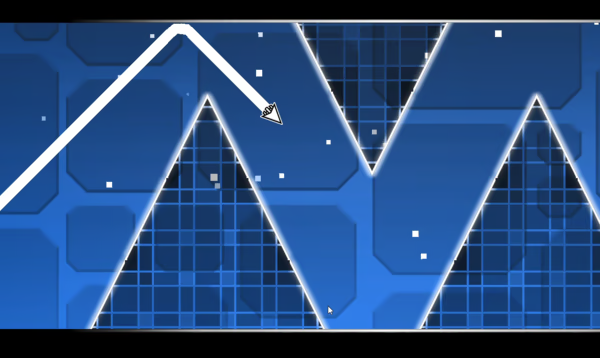
Figure 2. Gameplay of Wave Challenge
Tips for Playing Geometry Dash Wave Challenge
To get through difficult levels, focus on controlling your movement rather than trying to react as quickly as possible in every situation.
- Look ahead before adjusting: Watch the open space in front of you to decide when to move up or down. This helps prevent rushed inputs.
- Use short inputs: In narrow corridors, brief button presses can help you adjust your height more precisely than holding the button for too long.
- Remember difficult sections: If you keep failing at the same spot, pay attention to your input timing and the layout of that section.
- Practice one section at a time: If your version includes Practice Mode and checkpoints, use them to work on difficult sections instead of restarting from the beginning every time.
- Maintain a steady rhythm: Avoid changing direction too frequently without a clear reason. Once you find a rhythm that works, stick with it until the level layout calls for an adjustment.
Unique Features of Geometry Dash Wave Challenge
Customize Your Wave to Match Your Style
Wave appearance customization offers an appealing option for players who enjoy personalizing their characters. When this feature is available, you can choose a look that matches your style and gives your character a distinct appearance as you tackle each level.
Changing your character's appearance can also keep the experience fresh after multiple attempts. Alongside the goal of completing each level, players have another reason to explore different looks and find their favorite style.
Change the Wave's Size Through Portals
Size-changing portals add another layer of challenge to the familiar control system. When you pass through a portal that makes the Wave smaller, you need to adapt to its new size and the available space while continuing to adjust your trajectory to avoid collisions.
These changes mean that memorizing a fixed control rhythm isn't always enough. You need to assess the situation after each portal, identify the remaining space, and adjust your inputs accordingly.
Skills to Master in Geometry Dash Wave Challenge
Navigating Narrow Corridors
When moving through corridors with spikes above and below, watch for safe openings and adjust how long you hold the button. Holding it for too long can send the Wave too high, while releasing it for too long can cause a collision with the floor.
Adapting to Size-Changing Portals
Some levels may feature portals that make the Wave smaller. After passing through one, quickly assess the new layout and adjust your pressing and releasing rhythm. Instead of sticking to the same control pattern from the previous section, react to the available space ahead.
Maintaining a Steady Trajectory
Funnel-shaped corridors and consecutive spike formations require precise movement through tight spaces. Try to keep the character near the center of the path when there's enough room, and avoid sudden changes in direction.
Conclusion
Geometry Dash Wave Challenge delivers an experience focused on one of the most recognizable mechanics in Geometry Dash: controlling the Wave through obstacle-filled corridors. Its simple controls, demand for precise reflexes, and constantly changing paths make every attempt an opportunity to sharpen your skills.
If you enjoy this style of gameplay, check out Geometry Dash Lite to experience classic platforming levels. Each version offers a different approach, bringing something new to your journey through the world of Geometry Dash.