About Geometry Dash Tidal Wave
Geometry Dash Tidal Wave is a geometric platformer where players guide a character through dense obstacles with precise movements. This version of Tidal Wave delivers fast paced gameplay featuring narrow corridors, sharp spikes, portals, and striking lighting effects.
The game's appeal lies in how a small movement can determine the outcome of an entire run. Players need to watch the path, time their jumps or direction changes, and react quickly to obstacles that appear along the way. When mistakes happen, retrying and memorizing dangerous sections can help improve control with each attempt.

Figure 1. A geometric platformer
How to Play Geometry Dash Tidal Wave
The main goal is to guide your character through obstacles and reach the end of the level without crashing. Narrow passages require players to combine careful observation with well-timed inputs instead of relying on constant button presses.
Controls
Controls may vary depending on the version and movement mode. In the common Wave mode found in Geometry Dash, the basic controls are:
- PC: Hold the left mouse button or Spacebar to move diagonally upward, then release to change direction and move diagonally downward.
- Mobile: Touch and hold the screen to control the character, then release when you need to change direction.
Tips for Playing Geometry Dash Tidal Wave
- Practice difficult sections: Break the level into smaller parts to memorize the locations of spikes, portals, and narrow corridors.
- Adjust your timing: In Wave mode, try short presses and releases to control your movement more precisely.
- Look ahead: Don't focus only on your character. Watch for upcoming obstacles so you can prepare to change direction in time.
- Keep trying after each failure: Identify what caused the crash and adjust your movements instead of repeating the same approach.
Styles of Geometry Dash Tidal Wave
Geometric Design
Geometric shapes are the foundation of Tidal Wave's visual design. Squares, triangles, circles, and polygons appear throughout the level, from platforms to complex traps.
Triangular spikes create clearly defined danger zones, while rectangular platforms and polygonal structures form corridors with varied shapes. Circular objects surrounded by sharp rays add visual interest, making the game environment resemble a system of machinery or active energy.
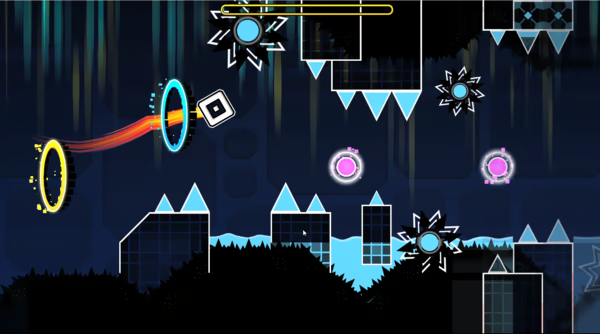
Figure 2. Geometric Design
Neon Effects
Neon effects create a striking contrast between objects and the dark background. White outlines define platform shapes, while cyan, yellow, and pink highlight important details.
Glowing yellow and cyan portals immediately draw the eye. Pink rings feature layered halos, while small square particles create the impression of energy radiating from nearby objects.
Dark Futuristic Atmosphere
The navy-blue background combines black shapes, vertical structures, and details resembling pipes or metal columns to create a sci-fi atmosphere. Dimmer background elements help foreground obstacles stand out.
The combination of dark scenery and neon lighting creates a mysterious, intense and slightly tense mood. Meanwhile, overlapping geometric layers add depth to the 2D environment without distracting players from the path ahead.
FAQs About Tidal Wave
Is Geometry Dash Tidal Wave difficult?
Yes. The original Tidal Wave level is classified as an Extreme Demon and is known for its precise controls and difficult Wave sections. The difficulty of browser versions may vary depending on their design.
Can you play Geometry Dash Tidal Wave on mobile devices?
This depends on the version available on the website. If the game supports touch controls and a mobile friendly display, players can use tap and hold inputs to play.
Does Geometry Dash Tidal Wave have a Practice Mode?
Practice Mode is a familiar feature in the original Geometry Dash, allowing players to practice individual sections using checkpoints. However, this feature is not guaranteed to be available in every browser version of Tidal Wave. Check the game's interface to see which modes are supported.
Take on a New Challenge with Geometry Dash Lite
Geometry Dash Tidal Wave delivers an experience for players who enjoy speed, geometric obstacles, and challenges that demand precision. From its controls to its neon visuals against a dark background, every element contributes to an intense level that encourages players to improve their skills with each attempt.
If you want to get familiar with Geometry Dash gameplay through more accessible levels, explore Geometry Dash Lite. It's a great way to sharpen your reflexes, practice jumping, and learn how to avoid obstacles before taking on tougher challenges. Give it a try!