The Idea Behind Geometry Dash Lite 3D: Bringing a 2D Challenge Into a 3D World
From the Original Inspiration to a New Experience
Geometry Dash became popular thanks to a simple idea: the character moves automatically, and you must time your actions perfectly to overcome obstacles. With just one familiar control, each level can become a test of reflexes, memory and concentration. This combination of simple controls and a difficulty level that rewards practice inspired the direction behind Geometry Dash Lite 3D.
In everyday life, interesting challenges often arise when a familiar activity takes place in a new setting. A jump can become more difficult when the distance changes, just as judging a path becomes more complicated when your view is no longer limited to a flat surface. The idea of bringing Geometry Dash gameplay into a 3D space comes from exploring these differences to create an experience that feels familiar while offering a fresh perspective.
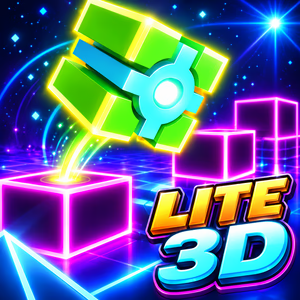
Figure 1. Play Geometry Dash Lite 3D right in your browser
Solving the Challenges of Moving From 2D to 3D
The biggest challenge is not simply turning geometric shapes into three-dimensional objects. With added depth, you need to judge distances, observe obstacle positions, and decide when to act in a visually different environment. If the design is not well balanced, the new perspective can make the game confusing instead of creating an exciting challenge.
That is why the design needs to balance visibility and difficulty. Obstacles must be clear enough for you to recognize potential dangers, while the track layout should still challenge your reflexes and encourage practice.
What Is Geometry Dash Lite 3D?
Geometry Dash Lite 3D is a platformer with arcade elements, inspired by obstacle-dodging gameplay and presented in a 3D environment. You control a cube-shaped character moving along a track, avoid obstacles, and try to complete each level without crashing.
Styles: Geometric Visuals in a 3D Space
Geometry Dash Lite 3D focuses on geometric shapes, tracks, and clearly defined obstacles. The three-dimensional presentation adds a sense of depth, making the journey through each obstacle feel different from the familiar flat perspective.
Bright colors help distinguish different elements throughout each level, while the movement of the character and environment maintains a sense of speed. The geometric design also preserves the distinctive style of the Geometry Dash series without relying on overly complicated environmental details.
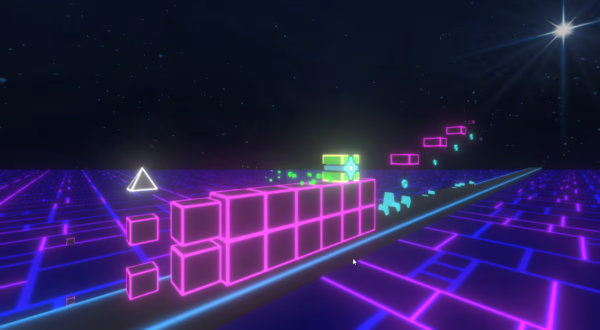
Figure 2. Styles of Geometry Dash Lite 3D
Gameplay: Dodging Obstacles With Reflexes and Precise Timing
In Geometry Dash Lite 3D, the character automatically moves forward, and your job is to control its actions to avoid danger. Each section requires you to observe the path and choose the right moment to act, especially when multiple obstacles appear in quick succession.
In the early sections, you can get familiar with the movement rhythm and learn how to jump over basic obstacles. As the challenges become more complex, remembering the layout and maintaining consistent control become increasingly important. A jump that comes too early or too late can end your run.
Controls: How to Play Geometry Dash Lite 3D
The controls are designed to be simple, allowing you to focus on the track instead of memorizing multiple actions.
- Spacebar: Press to jump over obstacles in versions that support keyboard controls.
- Left Mouse Button: Click to jump in versions that support mouse controls.
- Touchscreen: Tap the screen to control your character on compatible mobile devices.
The Obstacle System in Geometry Dash Lite 3D
Obstacles create most of the game's challenges. Each type requires you to observe the track and choose the right way to react.
- Spikes: Require precise jump timing to avoid collisions.
- Blocks: Test your reflexes and ability to recognize obstacles along the track.
- Gaps: Require you to time your jumps to cross broken sections of the path.
- Raised Platforms: Challenge you to judge landing positions and the distances between surfaces.
- Obstacle Sequences: Combine multiple challenges in a short stretch, requiring you to maintain a steady rhythm.
The combination of different obstacles turns each section into a test of observation, memory, and reaction time. Instead of focusing on just one obstacle, pay attention to the entire path ahead so you can prepare for your next move.
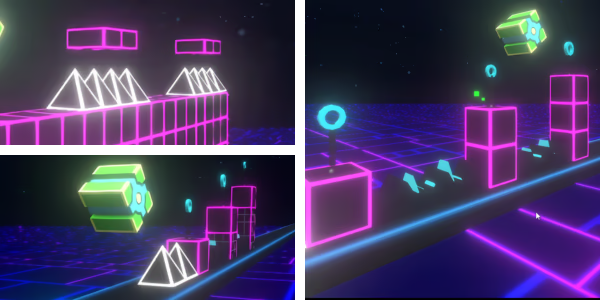
Figure 3. The Obstacle System
Geometry Dash Lite 3D on geometrydashlite3d.com
The goal of geometrydashlite3d.com is to make Geometry Dash Lite 3D easy to access directly through your browser. Playing on the web reduces the setup required, allowing you to focus on exploring the mechanics and testing your reflexes.
When you start, get familiar with the controls, observe how the character moves, and pay attention to the distances between obstacles. If you cannot complete a section, do not rush to change every action at once. Identify where you failed, remember the layout, and adjust your jump timing on the next attempt.
Geometry Dash Lite 3D offers a fresh take on familiar obstacle-dodging gameplay through a perspective with greater depth. The combination of geometric visuals, continuous movement, and precise timing creates a challenge for anyone who enjoys arcade games. Start your run, sharpen your reflexes with every attempt, and conquer the track through persistence.