What Is Geometry Arrow 3D?
Geometry Arrow 3D is an arcade game where you control an arrow through a three-dimensional environment, timing your movements to dodge obstacles along the way. With 3D perspective, geometric shapes, and eye-catching neon effects, the game offers a different experience from the traditional 2D version of Geometry Arrow.

Figure 1. Every second matters in Geometry Arrow 3D
Geometry Arrow 3D Visual Design
Geometry Arrow 3D lets you control an arrow in a three-dimensional world filled with geometric shapes and challenging obstacles. Its design focuses on visual awareness, judging distances, and reacting at the right moment.
Three-Dimensional Space
Unlike the flat-screen style commonly found in traditional Geometry Arrow games, Geometry Arrow 3D uses depth and perspective to make the arrow feel like it's traveling through a real course. Walls, corridors, and obstacles appear at different distances, making spatial awareness an important part of the gameplay.
The 3D environment also changes how you approach each challenge. Instead of watching a fixed path, you need to pay attention to upcoming obstacles and adjust your movements accordingly. When the route gets narrower, predicting what's ahead helps reduce the risk of collisions and keep your run going longer.
Glowing Neon Geometric Visuals
The neon style gives Geometry Arrow 3D its distinctive look. Glowing outlines, geometric shapes, and contrasting colors create a modern atmosphere while making objects stand out against the dark background.
Lighting effects combined with movement create a strong sense of speed. As the arrow approaches an obstacle, you need to focus on the available gaps instead of getting distracted by decorative details. The combination of minimalist visuals and neon effects keeps the game eye-catching while maintaining its focus on precise control.
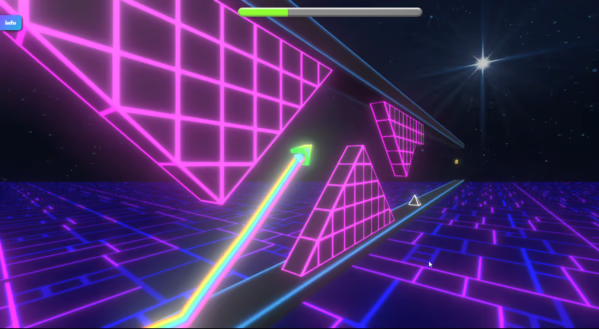
Figure 2. Neon Geometric Visuals
Geometry Arrow 3D Gameplay
Geometry Arrow 3D revolves around guiding an arrow through a series of obstacles in a three-dimensional environment. The arrow moves forward continuously, and you must change its direction or height to find a safe path. One mistimed move can cause a collision and end your run.
How to Play Geometry Arrow 3D
Your main goal is to guide the arrow past obstacles and complete each level. To succeed, you need to understand the controls, watch the path ahead, and avoid uncontrolled movements.
Controls
In versions that use keyboard controls, the basic inputs are described below:
- Up Arrow: Move the arrow upward.
- Down Arrow: Move the arrow downward.
- Left Mouse Button or Spacebar: Some versions use clicking or holding to control the arrow's height.
Tips
- Look Ahead: Watch for upcoming obstacles so you have enough time to choose your next move.
- Make Small Adjustments: Avoid changing height repeatedly before identifying a safe opening.
- Remember Collision Points: If you fail at a certain section, remember its position and adjust your timing on the next attempt.
- Stay Focused: As the speed increases, prioritize watching the path and making deliberate moves instead of pressing keys repeatedly.
Geometry Arrow 3D Levels and Game Modes
Level System
Geometry Arrow 3D may feature four maps, each with a distinct course layout. Changes in obstacle placement introduce new challenges as you progress from one area to another.
- Map 1 is suitable for learning the movement mechanics and practicing arrow control.
- Map 2 provides another opportunity to improve your awareness and timing.
- Map 3 focuses on navigating more complex sections.
- Map 4 challenges you to put all the skills you've developed to the test.
Game Modes
Two modes that may be available in Geometry Arrow 3D are Normal Mode and Practice Mode, provided both are included in the version you're playing.
- Normal Mode focuses on completing levels under standard conditions. You need to maintain steady control, avoid collisions, and find a way through the entire course.
- Practice Mode is useful for training on difficult sections. If the version supports checkpoints or the ability to resume from saved positions, this mode lets you focus on areas you haven't mastered without replaying the entire level from the beginning.
Frequently Asked Questions About Geometry Arrow 3D
Does Geometry Arrow 3D Require a Download?
If you play the browser version on geometrydashlite3d.com, you can open the game page and start playing without installing a separate application.
Why Does the Arrow Keep Colliding Even When I Move in the Right Direction?
Moving in the correct direction isn't always enough to avoid an obstacle. You also need to time your inputs carefully and pay attention to the distance between the arrow and nearby barriers. Try adjusting your movement earlier instead of waiting until an obstacle is too close.
Can You Play Geometry Arrow 3D on a Phone?
This 3D version supports gameplay on mobile devices.
Is Geometry Arrow 3D Suitable for Beginners?
Beginners can start by learning the controls and choosing easier levels. Trying again after each collision helps you understand the course layout and improve your reaction time.