What Inspired the Creation of Geometry Dash Breeze 3D?
Geometry Dash Breeze 3D was inspired by the idea of bringing the familiar obstacle-dodging gameplay of Geometry Dash Breeze into a world with greater depth. Instead of focusing only on geometric shapes and flat paths, this version creates a more immersive journey through slopes and obstacles.
Breeze evokes a sense of freedom. This idea shapes the game's visual style, with open spaces, vibrant colors, and smooth movement that creates the feeling of gliding along elevated paths. However, the relaxed visuals don't mean players can let their guard down. Obstacles along the way still require sharp observation and precise reflexes.

Figure 1. Explore the skies in Geometry Dash Breeze 3D
Shaping the Style and Design of Geometry Dash Breeze 3D
The 3D environment, soft lighting, and misty effects create a different feel from traditional geometric platform levels. Colorful shapes and paths are placed in a world with depth, making the obstacle course more visually engaging.
Slopes, twists, and obstacles along the route encourage players to pay attention to what's ahead and how the path changes with perspective. Spotting hazards is no longer just about recognizing a spike on a flat surface. Players also need to get used to the three-dimensional viewpoint.
Beyond visuals, movement plays an important role in the overall experience. The character moves continuously through colorful paths, creating a fast pace while maintaining the open, breezy atmosphere. Upbeat music also helps players stay focused throughout each run.
These elements aim to create a balanced experience: eye-catching visuals encourage exploration, while paths and obstacles remain at the center of the gameplay. The goal isn't just to build a beautiful world, but also to help players focus on their actions and timing.
What You Need to Know About Playing Geometry Dash Breeze 3D
Core Gameplay
In Geometry Dash Breeze 3D, the main objective is to guide a geometric character through obstacles and reach the finish line. Spikes, blocks, and changes in the path require players to react at the right moment to avoid collisions.
The fast pace makes every action count. Jumping too early may leave the character unable to clear an obstacle, while reacting too late may leave too little room to respond. That's why watching the path and remembering difficult sections are essential for improving your performance.
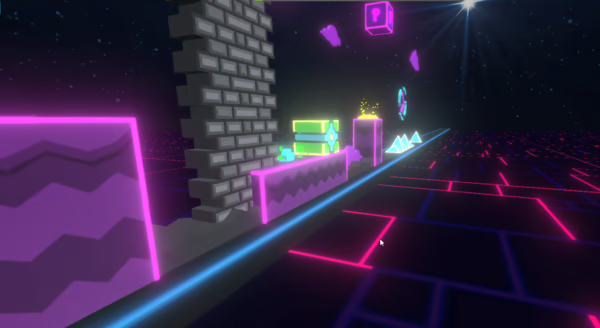
Figure 2. Core Gameplay
Controls
Them game keeps its controls simple, allowing players to focus on the path instead of memorizing complicated key combinations.
- On PC: Use the primary control indicated in the version you're playing.
- On mobile: Tap the screen if the version supports touch controls.
Game Modes
Geometry Dash Breeze 3D offers two main game modes: Normal Mode and Practice Mode. These options suit players who want to complete a level as well as those who need time to practice difficult sections.
- Normal Mode: Puts you into the main challenge, where a collision can force you to restart the level. This mode requires sharp observation, quick reflexes, and precise timing.
- Practice Mode: Helps you learn the level layout, practice clearing obstacles, and improve your skills with each attempt. It's a useful way to memorize difficult sections before switching to Normal Mode.
Checkpoints
In Breeze 3D, checkpoints help players practice by marking positions where they can resume a level. Instead of returning to the beginning after every failed attempt during practice, you can continue from a marked point and focus on improving the sections that give you trouble.
Checkpoints are especially useful when learning to handle consecutive obstacles, slopes, and twists in the 3D environment. They reduce the time spent replaying sections you've already cleared and help you memorize the level layout and refine your timing.
Geometry Dash Breeze 3D Tips for Beginners
To get comfortable with 3D paths and improve your obstacle-clearing skills, start with these simple habits:
- Watch the path ahead: Focus on approaching obstacles instead of looking only at your character's current position. This gives you more time to prepare your next move.
- Time your actions instead of tapping constantly: Different obstacles may require different reactions. Pay attention to distance and adjust your jump timing to avoid unnecessary collisions.
- Remember where you fail: After each attempt, identify the spot that caused trouble. Recognizing patterns in the path gives you a clearer plan for your next run.
- Get used to the 3D perspective: Take time to observe how slopes, twists, and blocks appear on the screen. As you become more familiar with the viewpoint, judging positions and preparing your next move becomes easier.
Conclusion
Geometry Dash Breeze 3D brings the obstacle-dodging formula of the Geometry Dash series into a three-dimensional environment featuring a sky-inspired setting, clouds, and colorful paths. Its main appeal lies in the combination of open visuals, smooth movement, and gameplay that demands precise reflexes.
While Geometry Dash Breeze focuses on a traditional platforming experience, Geometry Dash Breeze 3D stands out through its perspective and the sensation of moving through a world with greater depth.
| Feature |
Geometry Dash Breeze |
Geometry Dash Breeze 3D |
| Perspective |
Traditional platforming style |
3D environment |
| Visuals |
Geometric levels |
Sky, clouds, and paths with depth |
| Challenges |
Precise timing and obstacle avoidance |
Reflexes combined with adapting to the 3D perspective |
| Experience |
Focuses on paths and gameplay rhythm |
Emphasizes gliding through a 3D environment |