Where the Idea Begins?
Every game starts with an idea, but what makes that idea memorable is how it turns into a real experience. Geometry Dash SubZero builds on a seemingly simple concept: your character keeps moving forward while you watch the path ahead, anticipate obstacles, and react at just the right moment to make it through.
The fun comes from the gap between simple controls and challenging gameplay. You don't need to master a complicated control system to get started, but every jump demands more focus as you progress. A split-second delay can end your run, while making it through a section that once seemed impossible brings a unique sense of achievement.
Creating an engaging experience in Geometry Dash SubZero is about more than placing difficult obstacles in your path. Each challenge needs its own rhythm, every failed attempt should teach you something, and each retry should give you another chance to go further. The combination of quick reflexes, music, and the drive to improve forms the foundation of the game.

Figure 1. Origin of the concept for Geometry Dash Subzero
Turning the Concept Into Gameplay in Geometry Dash SubZero
Turning an idea into gameplay requires several elements to work together. Movement speed, obstacle placement, the spacing between jumps, and changes in movement mechanics all shape how you experience each challenge. If everything feels too easy, the journey can quickly become boring. However, if obstacles come one after another without a natural flow, it becomes harder to recognize your progress.
Geometry Dash SubZero strikes a balance through levels with distinct rhythms. Instead of relying on instinct alone, you need to learn how to read the path ahead. The challenge isn't just about avoiding obstacles. It's also about remembering sequences, recognizing patterns, and adjusting your timing to match each situation.
Neon Visual Style
The neon aesthetic helps define the game's identity. Clean geometric shapes, contrasting colors, and glowing effects create an energetic digital world where platforms and obstacles stand out against a constantly moving background.
This visual approach also serves a practical purpose. When your character moves forward at high speed, you need to spot spikes, gaps, and changes in the path quickly. Clear shapes make important details easier to recognize, while vibrant colors add a sense of motion and emphasize the rhythm of each section.
In SubZero, visuals do more than make the game look cool. They also guide your attention, helping you focus on the path ahead and notice changes as you move through each level.
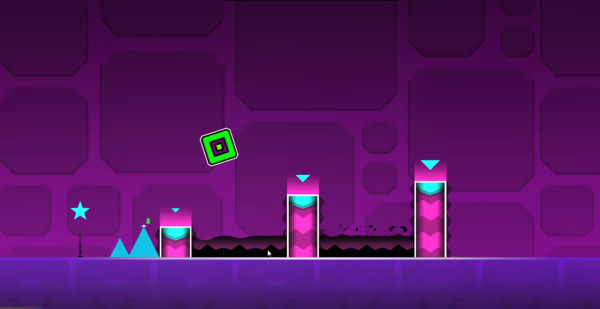
Figure 2. Neon Visual Style
Music Shapes the Experience
Music plays a major role in Geometry Dash SubZero. Electronic melodies, driving beats, and changes in the soundtrack create a continuous flow that connects your movements with the world around you.
As you play, you may begin to notice how the rhythm relates to the obstacles ahead. The music can help you remember sequences, develop a sense of timing, and make familiar sections easier to recognize on each retry.
This connection between sound and movement makes the experience more than a test of reflexes. It also challenges you to feel the rhythm, anticipate what's coming, and coordinate your focus with precise movements.
Gameplay
Geometry Dash SubZero revolves around navigating increasingly challenging obstacle courses. Your character moves automatically, while you decide when to jump or perform the appropriate action for the current movement mode. Spikes, gaps, platforms, and changes in character form keep you adapting throughout each run.
One of the most rewarding parts of the experience is how failure can help you understand a level better. You start recognizing where to jump earlier, which sections demand faster reactions, and which sequences are easier to handle once you've memorized them. When supported by the version you're playing, Practice Mode lets you focus on difficult sections instead of having to restart the entire level every time.
Controls
The controls are simple, making it easy for new players to jump in and start learning the game.
- Left mouse button: Click to perform the main action.
- Spacebar: Press to jump or activate the current movement action.
- Up arrow key: Use this key to perform the main action.
- Touchscreen: Tap to control the character on compatible mobile devices.
What matters most isn't how many buttons you have, but when you use them. Jump too early, and you might hit the next obstacle. React too late, and your chance to clear a gap may disappear. Learning the right timing is the key to making it further.
Press Start
Press Start is the opening level that introduces you to the world of Geometry Dash SubZero. From the first few sections, you'll need to watch the path and time your moves carefully. At the same time, the level gives you a chance to get familiar with the rhythm, basic jumps, and obstacle layouts.
As you move forward, sections that initially seem predictable begin to demand more focus. You need to react to the obstacle in front of you while preparing for what's coming next. This gradual shift creates a natural learning curve, allowing you to understand the level's patterns through trial and error.
Bringing Geometry Dash SubZero to the Browser
Bringing Geometry Dash SubZero to the browser offers players a more convenient way to jump into the action. Instead of starting with an app installation, you can visit geometrydashlite3d.com to explore the game and start playing directly in your browser.
As the publisher of this web version, the goal is to make the journey from discovering the game to starting a run as clear and accessible as possible. The game description, control instructions, and play area should help you understand what to expect, how to perform the basic actions, and how to get comfortable with the challenges ahead.
You can explore the game, find your rhythm, and discover your own way to overcome its toughest sections. Every attempt gives you another chance to sharpen your timing, learn the patterns, and push a little further.