Geometry Dash Slow
 Geometry Dash Scratch
 Dinosaur Game 3d
 Wave Race
 Geometry Ball: Challenge
 Geometry Dash Hyper Wave
 Two Tunnel 3d
 Geometry Dash Lite Old Version
 Geometry Dash 3D
 Subway Surfers
 Space Waves
 Geometry Dash Subzero
 Geometry Dash Bloodbath
 Geometry Dash Spam
 Geometry Dash Grief
 Geometry Dash Wave
 Geometry Dash World
 Geometry Dash Wave Challenge
 Geometry Arrow
 Geometry Dash Sonic Wave
 Geometry Vibes
 Geometry Dash Breeze
 Geometry Dash Tidal Wave
 Geometry Dash Nine Circles
 Geometry Dash Press Start
 Geometry Dash Meltdown
 Geometry Dash Demons
 Geometry Dash Retray
 Geometry Dash Extrapolation
 Geometry Dash Suponho
 Geometry Dash Polargeist
 Geometry Dash Onward
 Another Drink Dash
 Geometry Dash Wave 3d
 Geometry Dash Spam 3D
 Geometry Dash Daily Level Dream World
 Slope 3
 Geometry Dash Deadlocked
 Geometry Dash Switch
 Geometry Dash Hairless Adventure
 Geometry Vibes 3d
 On On Dash
 No Broke Dash
 Gaminia
 Geometry Arrow 3D
 Geometry Dash Subzero 3D
 Neon Challenge Legends
 Infrunami
 Geometry Vibes Monster
 Geometry Dash Meltdown 3d
 Geometry Dash Breeze 3D
 Victory Lap Dash
 I Just Might Dash
The Story of Geometry Dash Slow: A Journey Through Changing Dimensions
There was once a world that operated according to a steady rhythm, where every object moved within a set of established rules. Different areas were connected through geometric portals, energy flowed continuously between dimensions, and sound kept the entire system working in harmony. Every movement had its place, creating a lively yet balanced world.
An unexpected incident suddenly disrupted this order. The flow of time became unstable, causing movement speeds to differ from one area to another. In some places, everything seemed almost frozen, while other regions constantly shifted at uncontrollable speeds. The dimensional portals were affected as well, creating paths to worlds with completely different rules. Sound gradually disappeared, leaving behind a silent world filled with glowing geometric structures against a dark background.
Amid this strange setting, a small geometric character awakens and begins an exploration journey. With no complete map or predetermined route, the character must travel through each area, discover the portals, and adapt to the new rules. Every dimension presents a different challenge, from platforms covered in spikes to enormous systems of spinning saws and open spaces that require precise gravity control.
The journey becomes increasingly complex as the character repeatedly changes forms to overcome different environments. Each transformation introduces a new movement ability and brings the character closer to the energy source sustaining the world. Three hidden coins along the way serve as important milestones in this exploration, encouraging the character to search for less obvious routes.
The ultimate goal is to recover the lost rhythm and restore balance between the dimensions. The journey requires more than simply avoiding obstacles. The character must also master constant changes in speed, gravity, and movement direction.
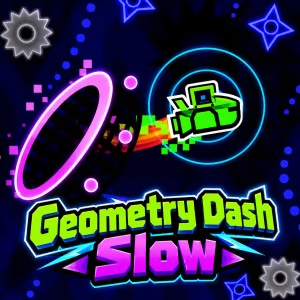
Figure 1. Geometry Dash Slow forms and movement mechanics
Geometry Dash Slow Gameplay: Travel Through a Changing World
Geometry Dash Slow features side scrolling platformer gameplay with automatic movement. The character keeps moving forward, while players focus on actions such as jumping, flying, reversing gravity, or changing direction. The objective is to overcome every obstacle, maintain safe movement, and reach the end of the level.
One of the most distinctive gameplay features is the portal system placed throughout the course. Each portal can change the character's form, size, or gravity, which also affects the controls. Players must quickly recognize each new state and respond with the appropriate action. A regular jump may become a height adjustment when the character transforms into Ship, while holding the control button creates a zigzag movement pattern when using Wave.
Obstacles appear in different shapes and at varying distances. Spikes are commonly placed on platforms or in areas with limited room to move. Large spinning saws create dangerous zones that players must avoid, while complex geometric structures require precise calculations of the character's movement path.
In addition to completing the level, Geometry Dash Slow offers three coins for an extra challenge. Some coins are placed along routes filled with obstacles, requiring players to adjust their movement paths instead of simply following the safest route.
The game features two main modes. Normal Mode requires players to complete the entire level in one attempt, while Practice Mode allows them to place checkpoints and practice individual sections. This gives players a chance to memorize obstacle locations, experiment with different controls, and improve their ability to handle difficult areas.
Different Character Forms and Challenges in Geometry Dash Slow
The character transformation system is one of the features that adds variety to Geometry Dash Slow gameplay. Throughout the journey, the character repeatedly switches between seven forms: Ship, Robot, Cube, Spider, Ball, UFO, and Wave.
Ship
Ship puts the character into continuous flight, allowing it to move up or down depending on the player's input. Holding the control button makes the character fly upward, while releasing it allows the character to gradually descend along its path. This mechanic requires players to control how long they press and release the button to maintain the right altitude.
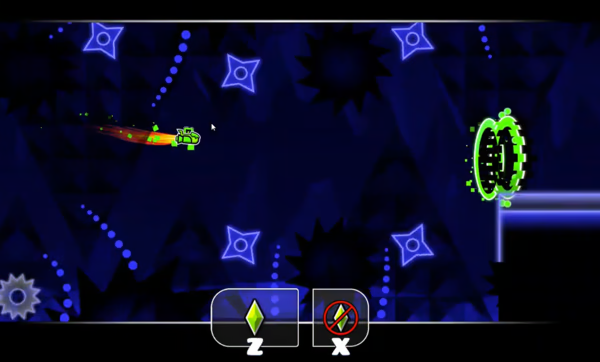
Figure 2. Ship form flying through geometric obstacles
Robot
Robot moves across platforms and uses jumps to overcome obstacles. Its most notable feature is the ability to perform jumps of different heights depending on how long the player holds the control button. This allows players to adjust their jumping distance and reach platforms positioned at different heights.
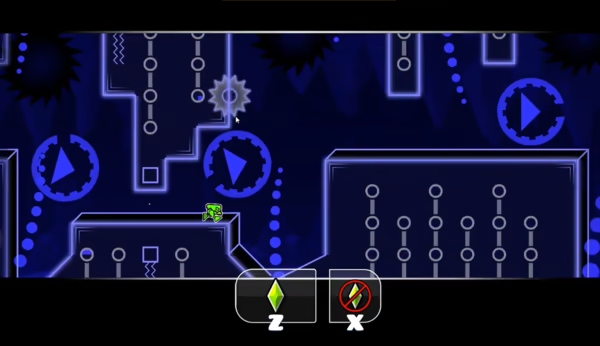
Figure 3. Robot form jumping across platforms
Cube
Cube is a familiar form with simple controls. The character automatically moves forward and jumps whenever the player presses the button. This action allows Cube to clear rows of spikes, spinning saws, and gaps along the path.
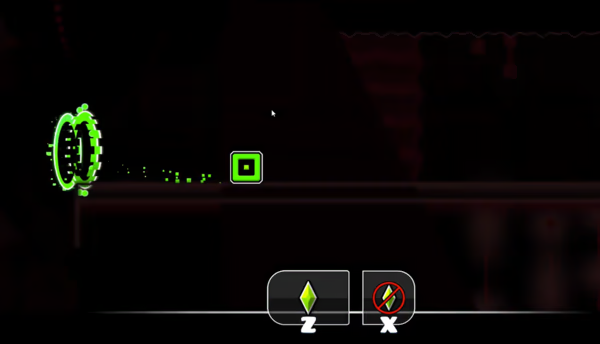
Figure 4. Cube form dodging spikes and saws
Spider
Spider features a quick gravity switching mechanic that allows the character to move from the bottom surface to the top surface and vice versa. When activated, the character instantly shifts to the opposite side instead of performing a regular jump along a curved path.
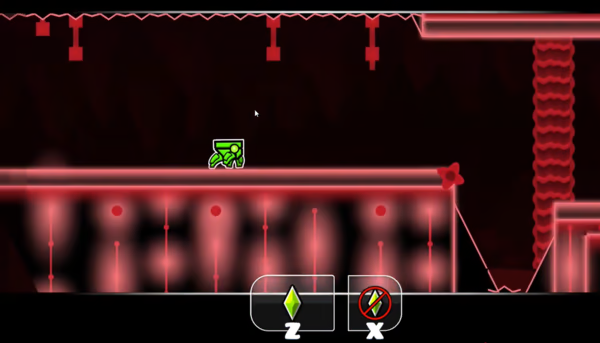
Figure 5. Spider form switching between surfaces
Ball
Ball uses gravity changes to move between the floor and ceiling of the level. When the player presses the button, the character reverses gravity and starts moving along the opposite surface. In this section, large spinning saws and orange jump rings create challenges involving positioning and timing. Players need to watch both surfaces to identify a safe route.
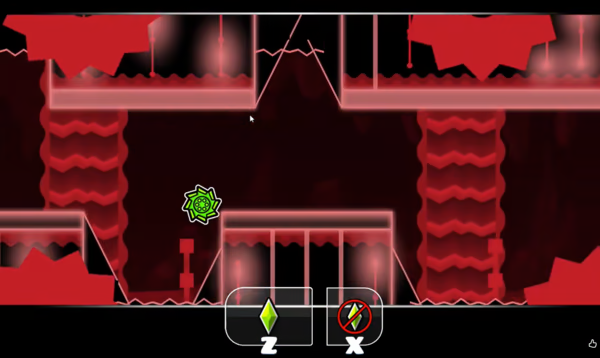
Figure 6. Ball form reversing gravity
UFO
UFO moves through the air with upward bounces activated whenever the player presses the control button. Each press creates an upward movement, helping the character maintain its altitude or clear obstacles ahead. When the player does not press the button again, the character continues to descend under the force of gravity.
Wave
Wave has a distinctive movement mechanic that creates a continuous zigzag path. Holding the control button moves the character diagonally upward, while releasing it changes the direction to diagonally downward. Combining these two actions creates a series of movements with clearly defined angles.
How to Play Geometry Dash Slow
Geometry Dash Slow uses a simple control system that works with both the keyboard and mouse. Since the character moves forward automatically, players do not need to control its forward direction. The basic controls include:
- Left Mouse Button: Jump or adjust altitude while flying.
- Space: Perform a jump or fly.
- Z: Place a checkpoint in Practice Mode.
- X: Remove the current checkpoint.
Practice Mode is a useful option for getting familiar with difficult sections. Placing a checkpoint before a complex sequence of obstacles allows players to test different movement strategies and memorize when to perform each action.
Geometry Dash Slow Visual and Sound Design
Visual Design
Geometry Dash Slow uses a 2D geometric art style with a side view. The character, platforms, and obstacles are all built from basic shapes such as squares, circles, triangles, and straight lines.
The dark background combines with blue and purple neon lighting to create the game's distinctive appearance. Glowing outlines surround the character, portals, and spinning saws, making important objects stand out in the environment. Colors also change continuously across different areas, creating shifts in atmosphere as the character enters new dimensions.
Lighting and movement effects help highlight each action. Glowing trails behind the character emphasize its direction, while bright visual effects make portals easier to recognize. The combination of geometric structures, contrasting colors, and continuous movement creates a visually consistent world.
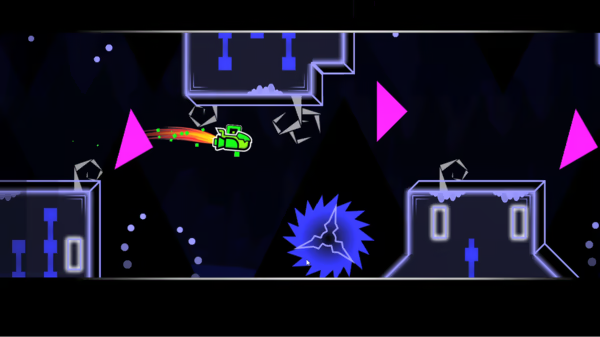
Figure 7. A 2D geometric art style with a side view
Sound Design
Music connects the different elements throughout the level. The melody provides a soundtrack for the journey, while sound effects accompanying the character's movements make each action easier to recognize. The combination of visuals and audio creates an experience focused on rhythm, speed, and character control.
F AQs About Geometry Dash Slow
What Is Geometry Dash Slow?
Geometry Dash Slow is a platformer inspired by the Geometry Dash style. Players control a character as it moves through obstacles, changes forms, and explores areas with different movement mechanics.
How Many Character Forms Are Available in Geometry Dash Slow?
The game features seven character forms: Cube, Ship, Robot, Spider, Ball, UFO, and Wave. Each form has its own control mechanics.
How Many Coins Can Players Collect in Geometry Dash Slow?
There are three coins hidden in different locations throughout the level. Players need to pay attention to alternative routes to collect them all.
Does Geometry Dash Slow Have a Practice Mode?
Yes. Practice Mode allows players to place checkpoints, train in individual sections, and continue from their saved positions after failing.
Play Geometry Dash Slow Online
Geometry Dash Slow can be played directly in a browser through game websites such as geometrydashlite3d.com. Players do not need to install separate software to get started. Simply open the game page, launch the level, and use a keyboard or mouse to control the character.
With multiple character forms, transformation portals, gravity switching, and three coins to collect, Geometry Dash Slow delivers a challenge that tests both reflexes and memory. Practicing individual sections in Practice Mode before tackling the entire level in Normal Mode is a solid way to work toward the finish line.